Showing posts with label What's New. Show all posts

Wednesday, January 6, 2010

Polar Bears…

I've been playing around with some other illustration techniques—mainly creating 3D sculptures and photographing them. This is my first attempt and was supposed to be this year's Christmas Card. *cough* They didn't quite get done. I wasn't happy with any of the photographs and need to make myself a portable photographers studio to get the lighting to come out better.

I made the bears out of sculpey clay then added eyes with a sharpie and nose and foot detail with powdered graphite. I then burnished that with a hog's hair bright to "set" the graphite. I tried photographing on a piece of glass over blue paper. I think I would have preferred to use the flaked snow in the background as opposed to the blanket of snow…


The lighting differences all have to do with the way I'm setting the white balance. I try a number of different settings and focus on different areas. Well, maybe this will be next year's Christmas card.


Tuesday, January 5, 2010

What’s New This Week…

Just finished up a book on undersea adventures for a local client. Here are some of the internal pages. The project was done in Adobe Illustrator and stared out with pencil sketches on copy paper.


Friday, October 2, 2009

New Children’s Illustration…

This is another project for the same product line. This piece is all about discovery in your back yard. Not my back yard though—mine's all gravel, what with living in the desert—but it's the backyard I remember from growing up in Colorado. This family lives in my favorite style of house—the Craftsman Bungalow.

I made a number of illustration style evolutions in this piece. Most notably, the texture to the trees. it's something I've wanted to implement for a while now, and this seemed the perfect place to do it. I'd started to put in texture like this working on the Charlie the Choo-Choo books. The leaf shapes were inspired by the sky designs as seen in Spongebob Sqaure Pants. Yes, I watch that show. I was a little worried about the overall crazy-business of the piece, but my client said "bright, bright, bright," and are even adding more color to their packaging. Whew! A bit of color overload, so I kept the palette tighter with a complimentary (red-green) color scheme. I also added some of my signature smoke, as found in the Charlie the Choo-Choo series of children's books.

Detail of the image.

New Children’s Illustration…

An illustration for a local game company for one of their new projects. This piece was created in Adobe Illustrator. It focuses on small town environments and what you might see along an afternoon walk. Though honestly, I'd love to see the town that has buildings this fun.


Detail of the drawing. If you've ever had the opportunity
to feed a giraffe, you will recognize their long tongues.

Friday, July 31, 2009

Writing World

Screen grab of the game in progress.

This is the second in a series of games done for Dreamco for the Tucson Public Library's summer reading program. The device is to capture the letters to complete a sentence sort of in a crossword puzzle style. We decided to keep the background very Tucson with the desert colors and landscape. I originally had a green grassland but Greg at Dreamco suggested the more desert brown and he's right—way more desert-y! I myself prefer sunsets and sunrises for background sky colors as I think that is the time the desert is most alive, so I created the background around that. Go test your skills hunting desert bugs here: Pima Public Library.

P.S. I almost always do my rough sketches in blue pencil. It helps me keep neat lines when I go over it in graphite and I can set my scanner to eliminate the blue. But I don't like those non-repro pencils—way too hard and you can't see what you're doing. Great for paste-up, not so good for sketching.


Background play space. You'll see saguaro, prickly pear,
mesquite, palo verde and a simple desert background.


Intro page ready for text.

Tuesday, July 28, 2009

Evolution of An Illustration

A few months ago I had the pleasure of working on video game art for a local company. There are 6 games in total, and today I feature the work on Robot Rock! Starting with loose sketches I explored numerous shapes of robots, some inspired by everyday household objects.


Next, I worked up a background and drew up one of the robots to near completion to see how it would interact. I wanted a really dramatic background, but when in color, it would be quite minimal. Does that make sense?


The developer wanted kids to be able to choose a “girl” or a “boy” robot, so here they are:


And here's the final layout:


If you're interested in playing the games, check them out here: Pima Public Library.

Friday, July 24, 2009

Spot Graphics…


Spot illustrations depicting different personality types among trendy young women.

Thursday, July 23, 2009

New Look…

In anticipation of launching my new website, I've updated the blog to reflect the direction I'm going. I should have the new website up and running in about a week and will soon be re-directing all blog traffic there. In the meantime, take a look around and enjoy.

Tuesday, April 28, 2009

What’s New This Week…

I completed work on a new blog header for a friend of mine. I went for whimsy and fun, with emphasis on the color green.

If you get the chance, check it out at Mountain Mama. She has some fabulous hand knit apparel, as well as a new give away this week. Be sure to check out her handmade wedding dress write-up HERE.

Wednesday, April 22, 2009

Are you a twitter…

Well, I am now. Though I have no idea who would want to listen to my ramblings, I have become a twitterati at the bequest of one of my clients. If you're interested you can follow me as KRIllustration.

Thursday, April 16, 2009

Selected Sketches from Charlie the Choo Choo: A Day Away…


This is the second in a series of books by author Cyle Young, the first being Charlie the Choo Choo: A Day At Work. Such a fun story to illustrate!

Though I've been using Adobe Illustrator for over a decade, this is the first time I've done such a large project using only vector art. I traditionally use PhotoShop for a more textural and loose feel, but I wanted these images to be bright, cheerful and clean. I think Charlie would animate rather well.

I utilize a lot of clipping masks when I work in Illustrator and create my own blends rather than relying on Illustrator gradients. You get much more control and color brightness this way. I'll be posting some Adobe Illustrator tutorials shortly. Stay tuned!

Wednesday, March 4, 2009

What’s New This Week…

I’m almost finished with the illustrations for my most current children’s book.* I was pretty pleased with the way this page turned out and am especially fond of the filtered light in the shop. Hope you all like it!

*I should note, I’m illustrating the book but did not author it.


Original done in pencil on paper, scanned then drawn in Adobe Illustrator.

Thursday, February 26, 2009

What’s New This Week…

I’m working on a new children’s book—another one about trains. I can only show a little snippet of it so far. Here is the preliminary cover.


I’m using a much more simple illustration style—simple in that I am not using brush strokes or a painterly effect. It still takes me about 8-10 hours to draw and color each page. Plus I keep seeing things I want to change.

I also keep in mind that I don’t want any of my trains to ever look like Thomas or The Little Blue Engine. I also need to make my wheels appear to be moving faster … maybe a little blur is needed.

Monday, January 12, 2009

World Wide SketchCrawl turnout

Saturday was the 21st SketchCrawl started in 2004. People from all over the world attend local gatherings to sketch and hang out, then post their sketches for the world to see on their website.

The Tucson division met downtown at Bruegger's Bagels and had a great demo/tutorial by local artist, Deanna Thibault. She taught us all her technique of doing contour drawing with a sharpie while looking at the object, but never looking at your paper. It produced a piece of lineart that you then color in with watercolor or whatever media you enjoy. Here is my attempt:


The rest of the afternoon, I spent sketching at the renovated El Presidio. They had a number of people dressed in period costumes from the 1800s. They also had traditional dishes being cooked and thankfully a warm fire going on a rather cool Tucson morning.


I finished off the day sketching downtown at Stone and 6th. I'd like to ultimately turn this one into a pastel painting, as all of the individual buildings have their own color and feel.

Monday, December 8, 2008

What’s New This Week…

Here is the final version of an image created for MasterPieces Puzzle Co. This product should hit store shelves this spring. I just love the new look they are going with. Very fresh, clean and simple. Very not “mass-market.”


A few of the animals were done by the very talented Megann Colan.

Monday, November 24, 2008

What’s New This Week…

This week I’m wrapping up a really cute little product for MasterPieces Puzzles. It’s using a style that I developed for them a few months ago. We decided that a simple “cut-paper” look would be best for quickness and ease. Here are a few of the sketches prior to the finished piece.

Sea Otters:


Turtles:

Friday, November 21, 2008

“Going On a Train”


My first children’s book is published and printed, CDs are done and it’s ready for sale here « Music Speaks Publishing ».

It was printed locally by Skyline Printing and they did an excellent job. Great color, great binding and quality work all the way. This was definitely a learning experience for me as I am well into my second children’s book. I’m learning how to judge my time a little better as far as the illustrations go, and I’ve also learned to trust your own judgment. If an image isn’t working there is no sense in not just scrapping it and starting over. I did this on two of the spreads in the book and I’m very glad that I did that.

The finished book looks great and I hope that I can work with Pamela in the future on more projects.

Monday, November 3, 2008

Illustration Style: Step by Step

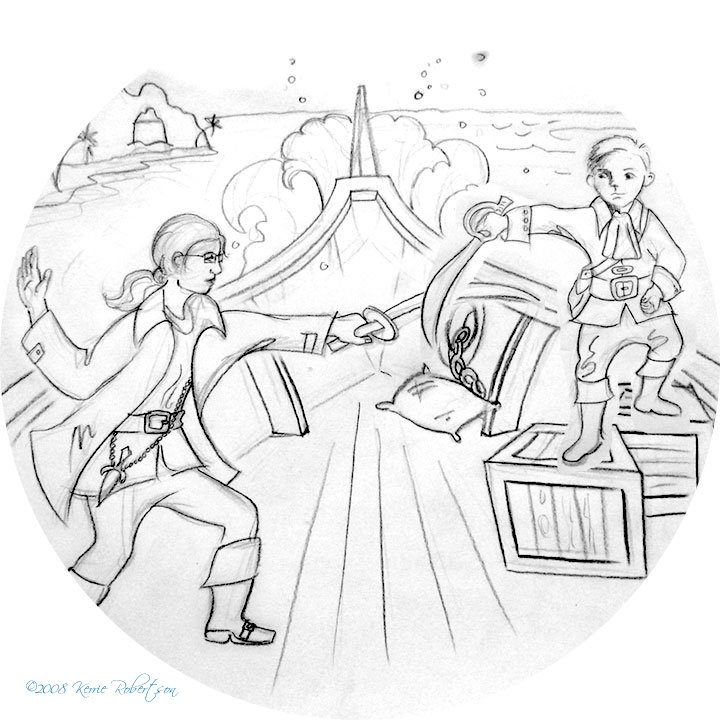
Today I’m working on coloring pages for a new Children’s Book. As I was working I thought it might be interesting to see the numerous steps that I take to achieve the finished result. Every illustrator works differently, and each one has their own techniques, but here are mine:

STEP 1: I use a blue colored pencil (not the non-repro blue; I find the pencil to hard to draw with as the lead is very dense) to draw in my line-work to work out the shapes and style. I then go over this with an HB graphite pencil and scan in the image. In my case, I don’t actually have a scanner, so I take a macro-shot with my digital camera and import this into PhotoShop to clean up. (A scanner is high up on my wish list!) Sometimes, I might rearrange elements in PhotoShop that I didn’t think were working as well as possible in the original sketch.


STEP 2
: I open my sketch in Adobe Illustrator and with a personalized brush that I have created, go over my sketch and create linework. I make subtle changes to the style and shapes to help refine the sketch.


STEP 3
: I add the color and refine the pallette in Adobe Illustrator. They have a tool called Live Paint Bucket, which is essential do doing these drawings quickly. Thank you Adobe! Here is where I start to notice little things that annoy me, like the girls sword tip lining up exactly on the edge of the ship – or tangent to this line. There’s also a few other areas and of course the rope needs to be brought in front of the girl, not under her leg to trip her.


STEP 4: I bring all of my layers into Adobe PhotoShop and start painting using a custom brush that I made. I want this to look like it was created in pastels, so it has a bit of a rough edge to it. This file is only 80% done at this point, however I’ll update it when it’s complete.